Processing Large Tables with Code, not Tool Calls
· Vincent Garrigues

Join the conversation — view and comment on this post on LinkedIn.
At Dexter, we process contracts for our customers, extracting both structured and unstructured data, like parties, terms, renewal clauses, payment terms, and many others.
Certain contractual documents include multi-page item catalogs or rate cards with thousands of items, and all of these must be extracted as structured data in Dexter.
The naive approach is to give an LLM a schema or an agent tools like create_price_item, and letting them work through all the items, but that does not work in practice.
One tool call per row doesn’t scale
One of our test documents is a 50+ page German framework agreement that contains over 40 tables, including one containing 2k price rows. If we were to let an LLM or an agent parse that, it would be expensive and wouldn’t actually work.
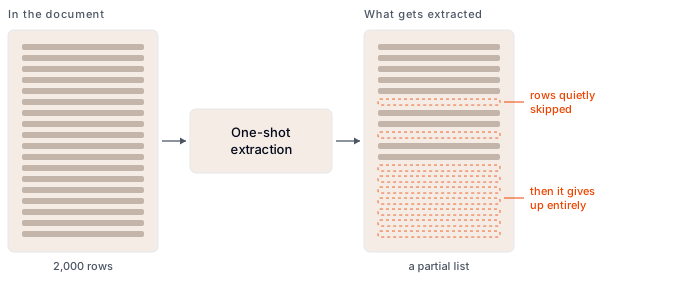
We’ve found that LLMs are still bad at processing long lists. A few hundred rows in, they’ll start skipping rows or they’ll give up. What you end up with is a partial list that is either obviously wrong, or even worse subtly wrong if it is only missing a handful of items. In the end, this is unacceptable.
OCR already found the tables
One of our pipeline steps is running documents through Mistral OCR, which by default returns the document in markdown format. Mistral also supports returning tables separately, in which case each table is lifted out of the page markdown and returned as its own entry.
Mistral also handles tables spanning multiple pages, which has been a problem in the past because often only the first page carries information about the table columns, which can confuse LLMs.
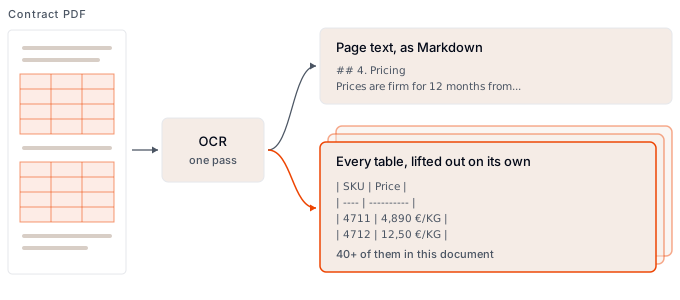
This is great, because we can now store and query the tables separately from the markdown document, which means that our agents are able to process them more efficiently.
The agent writes the parser
Now we’re storing the tables, but they usually all look different. You might have columns for currencies, coefficients, or any number of attributes you could find on price items. We can’t write a universal parser that would work on all tables, we need a custom parser for each table.
When our contract analysis agent comes across large tables of price items, it delegates the processing to a sub-agent. This sub-agent has one job and a reduced set of tools, and it works like this:
- Inspect the tables to understand what the columns mean
- Write a transform script
- Run the script in a sandbox and check the output
- Run the import
The sandbox
We can run Ruby code in a secure interpreter that has restrictions applied like the absence of internet access. We can also provide the interpreter with a handful of top-level functions that allow it to interact with certain Dexter objects, like a table extracted from a document:
list_tables
read_rows(table_index, from, to)
clean(value)   parse_money(value)   parse_int(value)   parse_date(value)
emit_row(row_hash)
...
The agent ends up writing a script that looks something like:
list_tables.each do |table|
  # only the first table of the annex carries a header row
  first_data_row = table["page"] == 27 ? 2 : 1

  read_rows(table["index"], first_data_row, table["row_count"]).each do |row|
    amount, currency = parse_money(row[2])
    emit_row(
      "name" => clean(row[1]),
      "sku" => clean(row[0]),
      "net_amount" => amount,
      "net_amount_currency" => currency
    )
  end
end
Utilities like parse_money handle the heavy lifting of parsing prices so the agents don’t have to re-invent the wheel.
Checking the work before it persists
Being able to extract data is good, but we also need to make sure that the data is valid. So after transforming the data, we take a sample of the rows and run them through our model validation. We collect error messages and hand them back to the model.
This helps the model gradually adjust the script until it lands on the correct one.
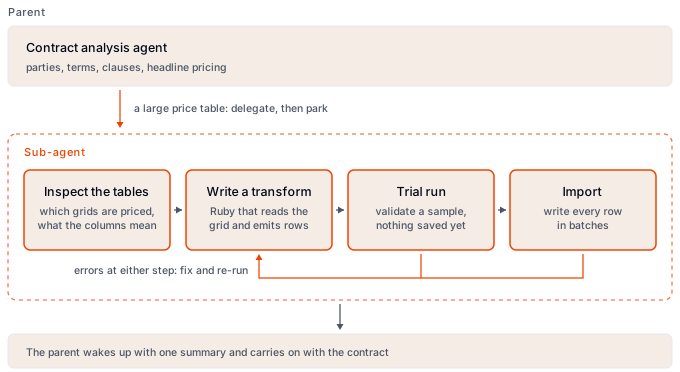
Once the samples are clean, we process the import in batches. If any error occurs, the agent can still adjust the script and re-run the import.
When the import succeeds, a summary is returned to the parent agent who can continue processing the contract. In practice, almost all runs are one-shot.
Generalizing the method
We use this method whenever we encounter long, uniform lists, or large quantities of data to process. In those cases, plainly using an LLM for processing them is the wrong tool. By using an LLM to understand the shape of the data, you can leverage what it is actually best at.
Happy hacking!