AI Visual Checks for Rails Apps
· Vincent Garrigues

To enable coding agents to tackle longer tasks, they need a way to verify what they just built. The test suite covers most of that for backend code, but for UI changes even system tests aren’t enough. Someone has to look at the page. That someone should be you, but it’d be nice if the agents could also do it so that they only ping you once the work is actually done, not when they think it’s done.
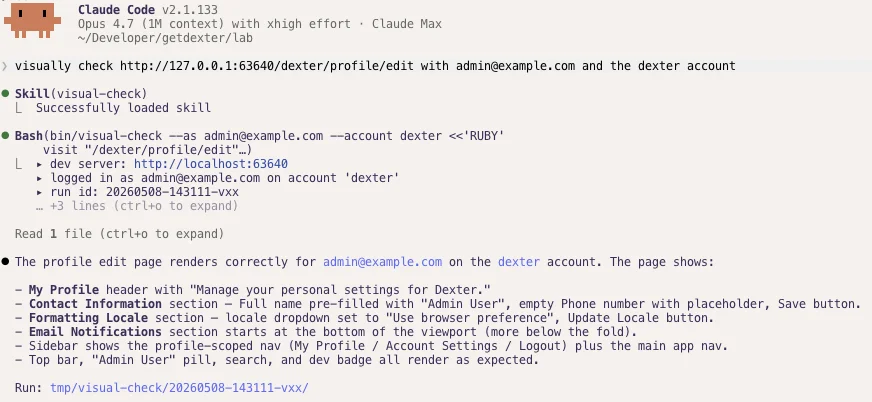
We gave our agents a small Ruby CLI that drives a real browser against the running dev server, takes screenshots, and writes them to disk where the agent can read them back. It’s tiny and leverages our existing system test infrastructure. Capybara and Selenium are already in the Gemfile of every Rails app for system tests, so there is not much new to add.
The shape of it
Agents love heredocs, so we optimized for that. The CLI takes a Ruby script on stdin and runs it in a Capybara session pointed at the local dev server. There are built-in tools to take screenshots and HTML snapshots, and authentication is built-in.
bin/visual-check --as vincent@example.test --account dexter <<'RUBY'
visit posts_path
screenshot "posts-index"
click_on "New post"
screenshot "new-post-form"
RUBY
Output:
▸ dev server: http://localhost:3000
▸ logged in as vincent@example.test (dexter)
▸ run id: 20260508-141522-a3f
▸ screenshot: tmp/visual-check/20260508-141522-a3f/posts-index.png
▸ screenshot: tmp/visual-check/20260508-141522-a3f/new-post-form.png
✓ done. 2 screenshots, 0 snapshots in tmp/visual-check/20260508-141522-a3f
That’s it, the agent sees the output and can check the screenshots. When the script errors, the CLI exits non-zero, captures failure.png and failure.html against the dying state, and writes a meta.json with the error class, message, and backtrace. The agent reads those instead of guessing.
The script context
Inside the heredoc, the script has the same access as the Rails console (models, route helpers, application code), plus the Capybara DSL and two run-level methods:
screenshot(name)writes<name>.pnginto the run directory.snapshot(name)writes<name>.html(the current DOM) for cases where the screenshot misses the detail.
We’ve also added Dexter-specific methods like upload_document to encode more complex interactions.
The point is to feel like the Rails console and give the agent as much access to the app as possible. We’re not writing a textbook acceptance test, we’re getting the fastest possible feedback loop. That’s also why the Capybara driver runs against the dev server: same database as bin/dev.
The skill
The skill at .claude/skills/visual-check/SKILL.md teaches the agent:
- When to reach for it (any UI change, not just bugs).
- How to invoke it (heredoc, single-quoted delimiter, never a
-c "..."flag). - What to do if
bin/devisn’t running (start it, don’t ask the user to). - How to interpret failures (read
failure.pngbefore assuming the script was wrong).
There’s one trick we use that many people miss when writing their own skills: you can embed runtime checks using the ! syntax. We use it to check whether the dev server is reachable:
Current dev server state:

!`curl -sfI --max-time 2 http://localhost:3000/up >/dev/null && echo "dev server reachable" || echo "dev server NOT reachable, start bin/dev yourself"`
When the skill loads, that command runs and its output gets injected into the prompt. The agent sees, right there in the instructions, whether the dev server is reachable. If it isn’t, the next line tells it what to do: start bin/dev in the background, poll /up, and proceed. You save a few tool calls, and the agent doesn’t stall waiting for you to start the server.
Try it in your app
This isn’t really Rails-specific. The principle is a small CLI that drives your frontend, takes screenshots, and writes them somewhere the agent can read back. This example uses Capybara. Our production app uses Playwright, which adds video recording on top of screenshots.
A nice side effect: once the agents are taking screenshots and videos, they start dropping them into pull requests, Linear tickets, and Slack threads on their own. Before/after images turn out to be useful documentation wherever a UI change shows up.
Sample code is in this gist. Happy hacking!